



Implementing a Consent Management Platform (CMP) involves more than simply adding a cookie banner to your website. A DPDPA-compliant CMP should help you collect valid consent, provide clear privacy notices, store consent records securely, enable users to withdraw consent, and maintain an auditable history of consent decisions. To enable that, organization needs to show DPDPA compliance notice at data collection point prior to gathering and processing of data.
A typical implementation includes identifying all data collection points like register page, lead generation, contact us page, apply for job and other collection points where personal data transaction is expected to happen with data principal. Which includes displaying purpose-specific consent notices, building a consent collection interface, storing consent artifacts securely, enabling consent withdrawal, and synchronizing consent changes across internal systems. Organizations must strictly ensure ensure that personal data is not collected or processed before the required consent has been obtained.
In this guide, we’ll walk through how you can implement a Consent Management Platform (CMP) with a complete technical implementation process, from discovering data collection points and building consent notices to designing consent APIs, storing consent records, handling withdrawals, and integrating with Consent Managers.
What You’ll Need to Implement a Consent Management Platform
Before you implement a Consent Management Platform (CMP), you need a clear understanding of where personal data is collected, how consent will be captured, and how consent records will be stored and managed. Skipping these preparation steps often leads to incomplete implementations, compliance gaps, and costly rework later. Before anything, make sure you have:
- Identified all websites, mobile apps, and customer touchpoints that collect personal data
- Mapped all forms that collect user information (registration, contact us, loan application, lead forms, etc.)
- Created an inventory of cookies, trackers, analytics tools, and marketing scripts
- Defined the purpose of each data collection activity
- Identified which consent choices are mandatory and which are optional
- Documented where consent records will be stored
- Defined how users will withdraw consent
- Planned a Preference Centre where users can manage their consent choices
- Identified third-party systems that need consent status updates (CRM, Marketing Automation, Analytics, etc.)
- Aligned legal, privacy, product, and engineering teams on compliance requirements
If you cannot confidently check most of the items above, complete these activities first before starting your CMP implementation project. Organizations that are still evaluating their privacy obligations should also review our comprehensive DPDPA Compliance Checklist for Indian Businesses (2026 Guide) to understand the broader compliance requirements that support a successful Consent Management Platform implementation.
Implementation Process of a CMP at a Glance
- Discover and classify all trackers, cookies, and data collection forms (audit phase).
- Build the Consent Notice component that renders before any form field or tracker.
- Build the Consent Banner / CMP for cookies and tracking technologies.
- Build the Consent API (backend service) that receives, signs, and stores consent events.
- Design the Consent Repository (append-only, tamper-evident database).
- Gate every script and data-write operation behind a consent check.
- Build the Preference Centre (self-service consent dashboard).
- Integrate with a registered Consent Manager via webhook/API.
- Add monitoring, hash-chain verification jobs, and audit logging.
- Test end-to-end: notice display → consent capture → signed artifact → gated processing → withdrawal propagation.
Each numbered step below corresponds to one of these phases, with working code.
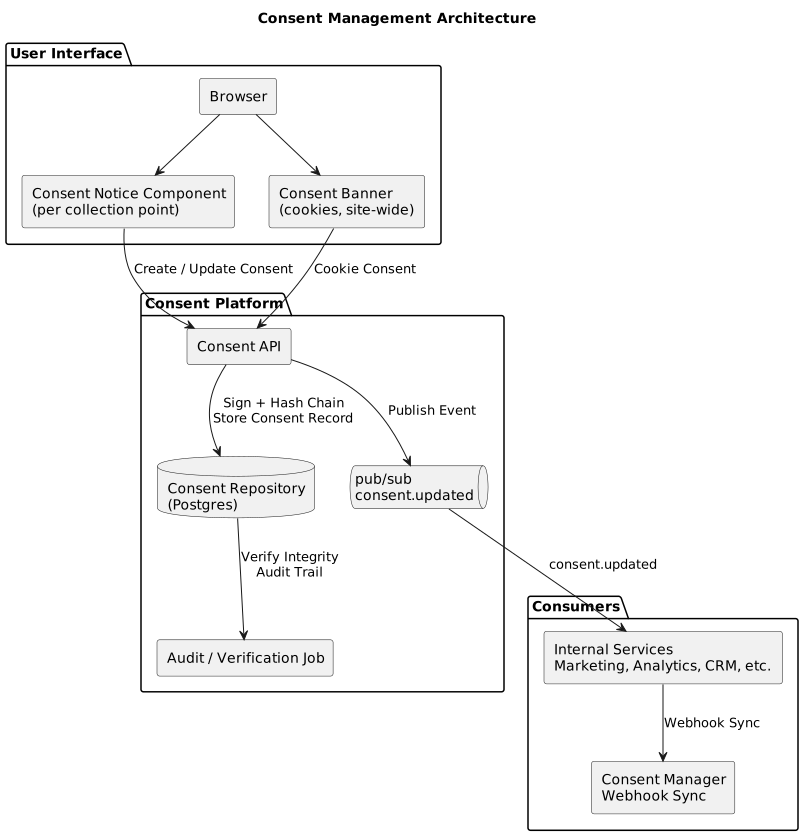
Reference Architecture and Tech Stack
A typical stack looks like this, though any equivalent stack works the same way:
- Frontend: React (or plain JS) for the Notice component and Consent Banner
- Backend: Node.js + Express (or any REST framework) exposing the Consent API
- Database: PostgreSQL for the append-only consent repository
- Signing: Node
cryptomodule (ECDSA) for signing Consent Artifacts - Messaging: Kafka/SQS/Redis pub-sub for propagating consent changes to internal services
- CM Integration: Outbound REST calls + inbound webhook endpoint
Step 1: Discovery – Automated Tracker and Form Scan
Make a list of all cookies, scripts, and form fields used on the website. This can be done automatically using a website crawler or manually by checking the browser’s developer tools. Save this information in a file called cookie-inventory.json. Both the cookie banner and privacy notice should use this file so that information stays consistent. Since cookies can be added, changed, or removed over time, the inventory should be reviewed regularly. Pay extra attention to secure HTTPS cookies and third-party tracking cookies. How cookie consent for collecting consent of website vistors and device a mechanism for enforcement and keep a log for compliance.
Step 2: The DPDPA Compliance Notice at Collection Points
DPDPA compliant notices must be shown before any field on a form is enabled for input, and before any data is collected by the organization. Usually, user user clicks submit button then notice for consent collection is spin dynamically based on consent required by organization. It is different from the cookie banner – the cookie banner governs tracking technologies site-wide, while this notice governs the specific personal data being collected on this page, for this purpose.
2.1 What the notice must contain
Based on the DPDPA’s notice requirements and the DPDP Rules, 2025, the notice must include, at minimum:
- A plain-language statement of what data is being collected on this page (name, phone, income, etc.)
- The specific purpose for each data element, written in simple language, not bundled
- A reference to the rights the data principal has (access, correction, erasure, withdrawal)
- Contact details for the Data Protection Officer and the grievance redress mechanism
- The name of the applicable Consent Manager, if integrated
- Separate, granular toggles or checkboxes for each purpose — never one combined “I agree” for everything
- A way to view the full notice text (expandable/linked), while the summary stays short
- The notice version identifier, so the consent artifact can record exactly which version of the text the user saw
2.2 Notice placement and blocking logic
The technical rule is: form fields are disabled (or the form is not rendered at all) until the notice is acknowledged and the relevant consent toggles are set. Submission of the form must be blocked client-side AND validated server-side (never trust client-side gating alone).
2.3 React implementation of the Notice component
Digital Personal Data Protection Act, 2023
Please review how we collect and use your personal data. You can choose whether to allow optional uses of your data.
Personal Data We Collect
- Full Name
- Email Address
- Mobile Number
- Email Address
- Mobile Number
- Email Address
- Mobile Number
2.4 Wiring the notice to the actual registration form
The form itself only renders, or only becomes interactive, after onConsentComplete fires. The consent payload is sent to the Consent API first, and the response (a consentId) is attached to the subsequent form submission so the backend can link the data to the exact consent artifact. Different user journey might require of integration of data principal verification methodologies like OTP, Email, Digilocker etc.
import { useState } from 'react'; import DpdpaConsentNotice from '../components/DpdpaConsentNotice'; export default function Register() { const [consentId, setConsentId] = useState(null); const handleConsent = async (consentPayload) => {
const res = await fetch(
  '/api/consent',
  {
    method: 'POST',
    headers: {
      'Content-Type':
      'application/json'
    }
  }
);

const { consentId } =
  await res.json();

setConsentId(consentId);
}; if (!consentId) { return <DpdpaConsentNotice onConsentComplete= {handleConsent} />; } return ( <form> ... form> ); }
2.5 Server-side enforcement
The /api/register endpoint must verify the consentId before writing any data, not just trust that the frontend showed the notice.
// Verify consent before processing registration

app.post( '/api/register', async (req, res) => {

const {
consentId,
name,
email,
phone
} = req.body;

const consent = await db.query( `SELECT *
FROM consent_events
WHERE event_id = $1
AND collection_point = 'registration_form'`,
[consentId]
);

if (
consent.rows.length === 0
) { return
res.status(403).json({
error: 'No valid consent found for this submission'
});
}

const mandatoryGranted =
consent.rows[0]
.artifact_json
.purposes
.filter(p => p.mandatory)
.every(p => p.granted);

if (!mandatoryGranted) { return
res.status(403).json({
error: 'Required consents not granted'
});
}


  // Create user record and
  // attach consentId for traceability


await db.query( `INSERT INTO users
(name, email, phone, consent_id)
VALUES ($1, $2, $3, $4)`,
[
name,
email,
phone,
consentId
]
);

res.json({
status: 'ok'
});
});
2.6 Multilingual rendering of the notice
Drive the PURPOSES array and notice text from a locale dictionary rather than hardcoding English. Store the dictionary as JSON files per locale and load based on the user's selected language, recording the chosen language field in the consent artifact (Step 4.3 already does this).
{
  "heading":
  "जारी रखने से पहले: हम आपकी जानकारी का उपयोग कैसे करेंगे",

"purposes": { "account_creation": {

```
  "label":
  "खाता बनाएं और प्रबंधित करें",

  "description":
  "हम आपका नाम, ईमेल और फोन नंबर खाता बनाने और OTP के माध्यम से सत्यापन के लिए उपयोग करते हैं।"

}
```

}
}
// Load notice text based on user's language


import noticeStrings from


`../i18n/notices/registration.${language}.json`
;
Step 3: Consent API and Database Schema
3.1 Database schema (append-only, hash-chained)
-- Immutable consent ledger
-- Stores every consent event for auditability


CREATE TABLE consent_events (

event_id UUID
PRIMARY KEY
DEFAULT gen_random_uuid(),

data_principal_id VARCHAR(128),


  -- Null allowed for anonymous
  -- or pre-registration flows


collection_point VARCHAR(64)
NOT NULL,

notice_version VARCHAR(32)
NOT NULL,

language VARCHAR(8)
NOT NULL,

artifact_json JSONB
NOT NULL,

artifact_signature TEXT
NOT NULL,

prev_hash TEXT,

record_hash TEXT
NOT NULL,

created_at TIMESTAMPTZ
NOT NULL
DEFAULT now()
);


-- Lookup all consent records
-- for a data principal


CREATE INDEX
idx_consent_principal

ON
consent_events (
data_principal_id,
created_at DESC
);


-- Lookup consent records
-- by collection point


CREATE INDEX
idx_consent_point

ON
consent_events (
collection_point,
created_at DESC
);
3.2 Consent API endpoint with signing and hash chaining
const crypto =
  require('crypto');


// Create a signed consent record
// and store it in the consent ledger


app.post( '/api/consent',

async (req, res) => {

const {
purposes,
noticeVersion,
language,
collectionPoint,
timestamp
} = req.body;

const
dataPrincipalId =
req.session.userId || null;

const artifact = {
dataPrincipalId,
collectionPoint,
noticeVersion,
language,
purposes,
timestamp
};

const
artifactString =
JSON.stringify(artifact);


  // Sign consent artifact using
  // ECDSA P-256 private key


const sign =
crypto.createSign( 'SHA256'
);

sign.update(
artifactString
);

const
signature =
sign.sign(
process.env
.CONSENT_SIGNING_PRIVATE_KEY, 'base64'
);


  // Find previous consent event
  // and continue hash chain


const last = await db.query(

```

```

`SELECT record_hash
FROM consent_events
WHERE data_principal_id = $1
ORDER BY created_at DESC
LIMIT 1` ,

```
  [dataPrincipalId]
);
```

const
prevHash =

```
last.rows[0]
?.record_hash ||

'0'
  .repeat(64);
```

const
recordHash =

```
crypto

.createHash(
  'sha256'
)

.update(
  prevHash +
  artifactString +
  signature
)

.digest(
  'hex'
);
```


  // Persist immutable consent record


const result = await db.query(

```

```

`INSERT INTO consent_events
(
  data_principal_id,
  collection_point,
  notice_version,
  language,
  artifact_json,
  artifact_signature,
  prev_hash,
  record_hash
)
VALUES
(
  $1,$2,$3,$4,
  $5,$6,$7,$8
)
RETURNING event_id` ,

```
  [
    dataPrincipalId,
    collectionPoint,
    noticeVersion,
    language,
    artifact,
    signature,
    prevHash,
    recordHash
  ]
);
```


  // Notify downstream systems


await publish( 'consent.updated',
{
consentId:
result.rows[0].event_id,

```
  artifact
}
```

);

res.json({
consentId:
result.rows[0].event_id
});
});
3.3 Verifying the hash chain (scheduled job)
// Verify consent ledger integrity
// Detect tampering with consent records


async function verifyChainForUser(
dataPrincipalId
) {

const events = await db.query(

```

```

`SELECT *
FROM consent_events
WHERE data_principal_id = $1
ORDER BY created_at ASC` ,

```
  [dataPrincipalId]
);
```

let expectedPrevHash = '0'
.repeat(64);

for ( const event of
events.rows
) {

```

// Ensure the chain links correctly


if (
  event.prev_hash !==
  expectedPrevHash
) {

  throw new Error(


```

`Hash chain broken at event
${event.event_id}`

```
  );
}


// Recompute hash and verify integrity


const recomputed =
  crypto

  .createHash(
    'sha256'
  )

  .update(
    event.prev_hash +
    JSON.stringify(
      event.artifact_json
    ) +
    event.artifact_signature
  )

  .digest(
    'hex'
  );

if (
  recomputed !==
  event.record_hash
) {

  throw new Error(


```

`Record hash mismatch at event
${event.event_id}`

```
  );
}

expectedPrevHash =
  event.record_hash;
```

}

return true;
}
Run this nightly across all users (or sampled batches for large user bases) and alert your security team on any failure — this is the technical evidence that your consent records have not been altered.
Step 4: Withdrawal and Real-Time Propagation
// Withdraw consent for a specific purpose
// Existing consent records are never deleted


app.delete( '/api/consent/:purposeId',

async (req, res) => {

const
dataPrincipalId =
req.session.userId;

const {
purposeId
} = req.params;


  // Record a new consent event
  // marking the purpose as withdrawn


await
recordConsentEvent({

```
dataPrincipalId,

collectionPoint:
  'preference_centre',

purposes: [
  {
    purposeId,

    granted:
      false,

    mandatory:
      false,

    withdrawnAt:
      new Date()
        .toISOString()
  }
],

noticeVersion:
  'preference-centre-v1',

language:
  req.session.language ||
  'en'
```

});


  // Notify downstream systems
  // to stop processing for this purpose


await publish( 'consent.updated',
{
dataPrincipalId,
purposeId,
granted: false
}
);

res.json({
status: 'withdrawn'
});
});
Downstream services subscribe to consent.updated and update their local cache or suppress processing immediately — e.g., a marketing email service listens and removes the user from the next campaign batch in real time, rather than waiting for a nightly sync.
Step 5: Preference Centre API
// Fetch current consent status
// for the preference centre


app.get( '/api/consent/status',

async (req, res) => {

const
dataPrincipalId =
req.session.userId;


  // Retrieve the latest consent
  // event for each purpose


const result = await db.query(

`
SELECT DISTINCT ON
(purpose->>'purposeId')

purpose->>'purposeId'
AS purpose_id,

purpose->>'granted'
AS granted,

created_at,

notice_version

FROM consent_events,

jsonb_array_elements(
artifact_json->'purposes'
) AS purpose

WHERE data_principal_id = $1

ORDER BY
purpose->>'purposeId',
created_at DESC
`,

```
  [dataPrincipalId]
);
```

res.json(
result.rows
);
});
Frontend Preference Centre

1. Load consent status
   GET /api/consent/status

2. Render purpose list
   as toggle switches

3. User enables consent
   POST /api/consent

4. User withdraws consent
   DELETE /api/consent/:purposeId

5. New consent event is
   written to the ledger

6. consent.updated event
   is published internally

7. Marketing, analytics,
   CRM and other systems
   automatically sync
Step 6: Consent Manager Sync (Webhook Integration)
// Outbound sync
// Notify Consent Manager whenever
// a new consent artifact is created


async function syncToConsentManager(
artifact,
signature
) {

await fetch(

```

```

`${process.env.CM_BASE_URL}
/v1/consent-artifacts` ,

```
{
  method:
    'POST',

  headers: {
    'Content-Type':
      'application/json',

    'Authorization':

```

`Bearer ${process.env.CM_API_TOKEN}`
},

```
  body:
    JSON.stringify({

      fiduciaryId:
        process.env
        .FIDUCIARY_REGISTRATION_ID,

      artifact,

      signature
    })
}
```

);
}
// Inbound sync
// Consent Manager notifies us when
// a user changes consent externally


app.post( '/api/cm-webhook',

async (req, res) => {

const {
dataPrincipalId,
purposeId,
granted,
cmSignature
} = req.body;


  // Verify Consent Manager signature
  // using its published public key


const verified =
verifyCmSignature(
req.body,
cmSignature
);

if (!verified) {

```
return
res.status(401).json({
  error:
  'Invalid CM signature'
});
```

}


  // Create a new consent event
  // Never modify historical records


await
recordConsentEvent({

```
dataPrincipalId,

collectionPoint:
  'consent_manager',

purposes: [
  {
    purposeId,
    granted
  }
],

noticeVersion:
  'cm-sync',

language:
  'en'
```

});


  // Notify internal systems


await publish( 'consent.updated',
{
dataPrincipalId,
purposeId,
granted
}
);

res.json({
status: 'ack'
});
});
1. User gives consent
   on fiduciary website

2. Consent artifact
   is digitally signed

3. Artifact is pushed to
   the Consent Manager

4. User later changes
   consent inside the
   Consent Manager dashboard

5. Consent Manager sends
   a signed webhook event

6. Fiduciary verifies
   CM signature

7. New consent event is
   appended to ledger

8. consent.updated event
   is published internally

9. Marketing, analytics,
   CRM and processing systems
   immediately honor the
   updated consent state
Build this behind an adapter interface (registerConsent(), onConsentUpdate(), fetchConsentStatus()) so you can plug in different CM providers without changing your core Consent API, since CM interoperability standards are still evolving.
Build vs Buy: Should You Build a CMP In-House or Buy?
One of the biggest decisions organizations face is whether to build a Consent Management Platform (CMP) internally or adopt an existing solution. While building offers greater flexibility, it also requires significant engineering effort, ongoing maintenance, and privacy expertise.
The table below compares both approaches:
| Factor | Build In-House | Use an Existing CMP |
|---|---|---|
| Initial Cost | Medium development cost | Subscription or licensing cost |
| Time to Deploy | 3-5 months building & testing | Days or weeks |
| Maintenance | Managed internally | Managed by vendor |
| Compliance Updates | Your responsibility | Vendor typically handles updates |
| Customization | Very high | Depends on platform |
| Audit Trails | Must be built from scratch | Usually included |
| Preference Centre | Must be developed | Usually included |
| Consent Withdrawal Workflows | Must be developed | Usually included |
| Multilingual Support | Must be implemented | Often available out of the box |
| Integrations | Fully customizable | Depends on vendor integrations |
| Engineering Effort | High | Low to moderate |
| Best For | Large enterprises with dedicated engineering teams | Startups, SMEs, and organizations seeking faster compliance |
For most organizations, the biggest factor is not technology but time. Building a production-ready Consent Management Platform requires much more than creating a consent banner. It also involves consent storage, audit trails, preference management, withdrawal handling, reporting, monitoring, and ongoing compliance maintenance.Testing and Validation Checklist
- Form fields are not rendered/enabled until the Notice component fires
onConsentComplete - Server rejects data writes if
consentIdis missing, invalid, or mandatory purposes aren't granted - Each consent artifact records
noticeVersionandlanguage, matching what was actually displayed - Hash chain verification job runs and alerts on failure
- Withdrawal via preference centre propagates to all subscribed services within an acceptable SLA (e.g., under 5 minutes)
- Cookie banner blocks marketing/analytics scripts until explicit opt-in, verified via network tab (no requests to analytics/marketing domains before consent)
- Notice and banner pass WCAG AA contrast and keyboard-navigation checks
- Notice renders correctly in at least the languages your user base needs, with locale recorded in the artifact
- Consent Manager webhook signature verification rejects unsigned/forged payloads
- Retention job archives consent events older than your active window while preserving hash-chain integrity in cold storage
This document provides simplified version of technical implementation patterns based on publicly available guidance on the DPDPA, 2023 and the DPDP Rules, 2025. Confirm specific field names, signing algorithms, and Consent Manager API contracts with your legal and security teams, and with the Consent Manager's published integration documentation once available.
Choosing the Right CMP
Selecting the right Consent Management Platforms based in India is essential for maintaining compliance, ensuring transparency, and building trust with your users. As the demand for effective data privacy solutions grows, exploring the DPDPA-compliant Consent Management Platforms becomes crucial. Whether you need a DPDPA-native solution like Concur, it’s important to choose a CMP that aligns with your business needs, regulatory requirements, and scalability goals. By carefully assessing factors like integration capabilities, user experience, and compliance features, you can choose a solution that not only meets legal obligations but also enhances your overall data privacy strategy.